How to
Suica, PASMO and ICOCA: How to Use IC Cards in Japan
An IC card is a rechargeable card you touch on the ticket gate. Suica, PASMO and ICOCA all work for trains and buses across Japan, and in many shops. Visitor versions need no deposit; here is which to get and how to use it.
✓ 13 facts checked against official sources on November 18, 2026Next check: around May 2027
At a glance
- What it is
- A prepaid card for trains, buses, convenience stores and vending machines. Touch it on the reader
- Which one
- Any of them. Suica, PASMO, ICOCA and 7 other cards can be used on trains and buses across Japan
- For visitors
- TOURIST PASMO and Welcome Suica: no deposit, valid for a limited time, balance not refunded
- Standard cards
- Most need a ¥500 deposit (for example, ICOCA ¥2,000 including the ¥500 deposit)
- On your phone
- PASMO in Apple Wallet on iPhone 8 and later; Welcome Suica Mobile app for iPhone
- Top-up limit
- Balance up to ¥20,000. Top up with cash at station machines
In Japanese cities you rarely need a paper train ticket. You touch an IC card (a rechargeable smart card) on the reader at the ticket gate when you go in, touch it again when you come out, and the fare is taken from the balance.
The cards have different names because different railway companies issue them: Suica by JR East (Tokyo area), PASMO by Tokyo's private railways and subways, and ICOCA by JR West (Osaka, Kyoto and western Japan). They work together. If you see the shared IC logo, you can use any of the 10 main cards, including Suica, PASMO and ICOCA, on trains and buses across Japan.
JNTO says an IC card will become your most treasured possession during your stay. It saves queuing at ticket machines, and you can also use it at many convenience stores, vending machines, coin lockers and some taxis.
Which card should I get?
- Arriving at Narita or Haneda (Tokyo): TOURIST PASMO, sold at both airports. Or Welcome Suica from JR East.
- Arriving at Kansai Airport (Osaka): ICOCA. A visitor design is sold at the JR ticket office at Kansai-airport Station.
- iPhone user: add PASMO to Apple Wallet, or use JR East's Welcome Suica Mobile app. No plastic card to lose.
- Android phone bought outside Japan: generally cannot use Mobile PASMO. Use a plastic card.
- It does not matter much which one you get: all three work in Tokyo, Osaka, Kyoto and other big cities.
Visitor cards: TOURIST PASMO and Welcome Suica
- JNTO says special IC cards for visitors, such as Welcome Suica and TOURIST PASMO, are available without a deposit.
- TOURIST PASMO: ¥1,000 to ¥10,000, depending on where you buy it. Sold at Haneda Airport and Narita Airport. No deposit and no service charge. Valid for 28 days from the date of purchase. Money left on the card is not refunded.
- Welcome Suica: JR East's card for visitors, also without a deposit. Check the price, where it is sold and how long it is valid on JR East's official site.
- A TOURIST PASMO for children can be used up to March 31 of the year the child turns 12.
Standard cards: ICOCA and others
- Most IC cards need a ¥500 security deposit when you buy the card.
- ICOCA: buy it from JR West ticket machines or JR West ticket offices (Midori-no-madoguchi). Credit cards cannot be used to buy ICOCA.
- The ICOCA for foreign visitors costs ¥2,000, including the ¥500 deposit, and is limited to one per person.
- When you leave, return an ICOCA to a JR West ticket office to get the ¥500 deposit back.
How to use it on trains
- Make sure there is some balance on the card (top up first if needed).
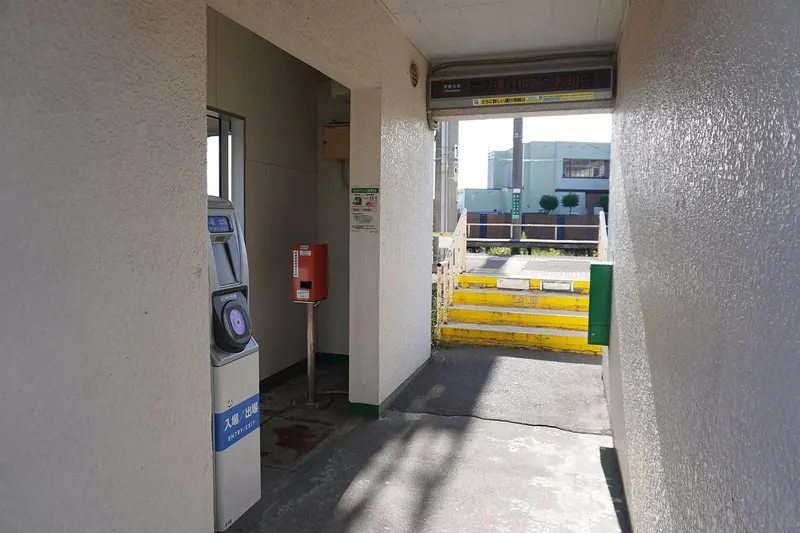
- At the ticket gate, touch the card flat on the blue or IC reader. The gate opens and shows your balance.
- Ride the train. You do not need to choose your destination in advance.
- At your destination, touch the card again at the exit gate. The fare is taken off.
- If the balance is too low, the gate closes. Use the fare adjustment machine near the exit gate to add money, then go through.
How to top up (charge)
You can also top up at many convenience store registers: hand over the card and the cash and say 'chāji onegai shimasu'. A TOURIST PASMO cannot be topped up if the balance would go over ¥20,000; on buses, top-ups are by ¥1,000 notes only.
- Find a ticket machine with the IC logo, or a 'charge' machine, in the station.
- Choose English on the screen, then 'Charge'.
- Put the card in the slot or on the reader.
- Choose the amount and put in the cash (have ¥1,000 notes ready).
- Take your card back.
On buses and in shops
- On buses, touch the reader by the door. Whether you touch when getting on, getting off or both depends on the bus company; watch the sign or other passengers.
- In shops, say you will pay by IC card (for example, 'Suica de') and touch the card on the reader when the staff tells you.
- PiTaPa (a card from the Kansai area) does not support shopping payments across Japan; the other main cards do.
Things to watch out for
- Not everywhere: PASMO says that IC cards are not accepted on all train and bus networks in Japan. Some rural lines and buses take cash only.
- Shinkansen and limited express trains: an IC card alone does not cover a reserved seat. Buy a ticket. See How to Ride the Shinkansen.
- Lost cards: a TOURIST PASMO cannot be reissued if lost. Keep the balance low.
- Use up the balance: money on visitor cards is not refunded. Spend it at a convenience store or vending machine before you leave.
- Japan Rail Pass holders: you still need an IC card for subways and private railways the pass does not cover.
Point-and-show Japanese
| English | Japanese | Romaji |
|---|---|---|
| I'd like to top up my card. | チャージをお願いします。 | Chāji o onegai shimasu. |
| I'll pay with my IC card. | 交通系ICカードで払います。 | Kōtsū-kei IC kādo de haraimasu. |
| My card doesn't work at the gate. | カードが改札で使えません。 | Kādo ga kaisatsu de tsukaemasen. |
| Where can I buy an IC card? | ICカードはどこで買えますか? | IC kādo wa doko de kaemasu ka? |
Before you go
- Put ¥2,000–3,000 on the card at first. That covers several days of city trains for most visitors (estimate).
- Keep the IC card in a separate pocket from other contactless cards so the gate reads the right one.
- If you add PASMO to Apple Wallet, set it as the Express Transit Card before you reach the gate.